How I Actually Get Work Done At Work

It’s here.

One of those miraculous days where you only have a few meetings, no travel, and there are some open spots on your calendar. Incredible! You can almost feel the productivity you’ll achieve during those open blocks of time: writing that PRD, reviewing that crazy long marketing deck, or finally taking that one-hour training course you’ve been pushing off for two months. You settle into that first open spot and get ready to rock.

But then the inevitable happens.

Your new email notification dings. You switch to Gmail to check it and, what the hell, while you’re there you’ll answer two more real quick. You see Skype bouncing in the doc, so you check it to see who you hit you up. A quick pit stop to check Facebook and Twitter, and before you know it’s 33 minutes later, you’re four articles into a click hole on Buzzfeed learning useless but hysterical facts about falconry*, and the open hour on your calendar just lost 50% of it’s potential productivity. You might as well write off the rest of the hour if you work in an open office or co-working space, since you’ll inevitably be asked a question from a colleague that turns into an impromptu meeting. You turn back to you computer and realize you’ll have to finish whatever you were working on at 8pm that night when you get home.

What the hell happened?

In the words of the infinitely-wise Sir Arnold Schwarzenegger, “You lack discipline!”** It’s not your fault; our entire digital condition is designed to alert us in real-time about almost everything, making it so we can barely keep focused on a single task, project, or document. For a while I thought I could pull off multi-tasking like a boss but then realized that I definitely couldn’t (and science says neither can most people).

A few weeks back I shared a post about why I wake up at 4:22am. Through the use of a few goals and a basic structure for my morning time, I made it easier to be more disciplined about how I spend that time – so I don’t get up early and just waste it browsing Twitter. I use the same concepts planning my day that I do in my morning routine: set some goals, block off the time, and setup my tools to help me be productive. Using these concepts I feel like I can (usually) get work done, at work, and not feel like I wasted too much time being randomized.

I firmly believe that you need to allocate the appropriate time to every task or else you’ll never get them any of them done during the day. I also believe that you can’t let notifications define how you spend your time. So, to start, here are my tactical goals for each workday:

  1. Output high-quality deliverables (can be written and verbal)
  2. Support my team (employees and co-workers)
  3. Support my management
  4. Learn something new

How I structure my day

Slide1

7:30am – 8:00am :: Triage and Prep
While eating breakfast at home I read through my inbox, scanning for emails requiring significant work and creating tasks for them in Asana. If the email needs long response I will Boomerang it for 9:30am. If it’s quick, I shoot off an answer. This is the basic “Getting Things Done” methodology that I’ve followed for years. The last step is crucial: for everything in Asana that is due today, I make sure it is has the appropriate time blocked off on my calendar – as an actual appointment.

9:30am – 10:00am :: Email
All of the emails that need a thoughtful response but no other work go into this time.

10:00am – 12:00pm :: PWT (Personal Work Time)
I keep the mornings blocked off to crank out large deliverables, like PRDs, contracts, or competitive reviews. During PWT I “go dark” (I’m a spy movie junkie) by eliminating all notifications. More on this later.

12:00pm – 12:45pm :: Lunch
I try as hard as I can to eat lunch away from my desk and with the team. With the amount of meetings I have this is often the best time during the day to catch up with the team, chat socially, and hopefully laugh a bit at some bad geek jokes.

12:45pm – 1:00pm :: Break
I hate going right back to work after I eat, so if it’s not terrible outside I will go take a lap or two around the block. I usually leave my phone in the office and try to do nothing but soak up a little of the city, clear my head, and get ready for the afternoon.

1:30pm – 2:00pm :: Work Email, Skype, Personal Email
Quick check on work email following the same methodology from the morning spot. I think take the remaining time to check my personal email and various social network accounts.

2:00pm – 5:00pm :: Meetings
This is where I focus on supporting my team and my management. I put all of my 1:1’s with my directs into this time period (once a week), plus any brainstorming or sync up meetings with our various teams and offices.

5:00pm – 6:00pm :: PWT
I usually get a spurt of creative energy later in the day, so I keep a PWT blocked off during this hour to crank through more meaty tasks from Asana. If I don’t have the creative energy that day I use this time to do a bunch of smaller tasks that have queued up in Asana (checking in with customers, investors, etc.).

6:00pm – 6:30pm :: Learning
I use this time to review internal wiki articles, trainings, or other work-related information that I want to read and review.

6:30pm – 7:00pm :: Email and Cleanup
A last pass through emails, creating Asana tasks and moving unfinished time blocks around the next few days.

This doesn’t hold true for every single day given that meetings, travel, and other natural causes can introduce unavoidable change, but I keep to it about 90% of the month. The change that most often happens is I have to slide stuff around during the day to accommodate last-minute meetings. The key here is to be disciplined but flexible. Just because you can’t accomplish something in the time you originally scheduled doesn’t mean that you just hope you’ll find the time later: grab the blocked off time and move it to a new spot where you know you can get it done.

How I setup my machine to get work done

In my “What I Use 2015” post I covered a few of the awesome tools and apps that help me be productive. Here’s a few setup-style tricks and hacks that I use to help me stay focused, especially during PWT.

Calendars
I use color coding as though my life depended on it. I find that it helps to make my calendar glance-able, and also let’s me visually audit my time to see if I’m spending it in the right places. I use colors for 1:1’s, working sessions, etc., but the most important are Red for Customer Interaction and Blue for PWT.

Multiple Chrome users
I have three user accounts on Chrome on my work laptop: Work, Personal, and Demo. We can ignore Demo since it is for demo’ing our product. In Work, I have all of my work accounts for ThinkingPhones, my Gmail, JIRA, and other accounts are all logged in here. I do not have Facebook or Twitter logged in to this user. In Personal I have, well, all my personal stuff like email, Twitter, FB, etc. I do not have my work stuff logged in there. This makes it so that when I’m cranking on work tasks in the Work persona I won’t easily open a Facebook tab and get lost in the feed.

Multiple Mac desktops
I have multiple Mac desktops setup for, you guessed it, Work, Personal, Demo, and an extra one for Tools. On Work is my Chrome persona for Work, Personal gets the Personal persona, etc. Tools contains our VPN client and terminal windows that I don’t want taking up space in the Work desktop. I have also setup certain programs so their windows open on certain desktops, so iMessage, Spotify, etc. all open on Personal while Evernote and Skype open on Work. This means that I have to make a fairly conscious effort to switch desktops just to check Facebook, Twitter, or iMessage. It sounds annoying to deal with but this has been the single biggest productivity hack I’ve had since the creation of MEATS (my version of GTD).

Skype
For all group chats, I turn off notifications and set it to alert me only if my name is mentioned.

Chrome notifications
I turn off all notifications for Gmail’s inboxes.

Mac DND
Whenever I’m in PWT, I flip the Mac Control Panel setting to ‘Do Not Disturb’. I will usually turn it off afterwards, but sometimes I like the quiet and I leave it off for the rest of the day. 🙂

Mac Clock
I set the system clock to announce the time at the top of every hour. I find it a helpful metronome to make sure I haven’t drifted focus, and also to stop and take a break for a minute to shake my legs out and stretch.

For You

Much like with my 4:22am morning routine, this style of working is definitely not for everyone and you can (and should!) come up with the hacks, tweaks, and structure unique to you that will make your days more productive. I’d love to hear any thoughts, feedback, or tricks you have in the comments, thanks!

-m

*As an aside, falconry is pretty legit (link) and someday I’d love to try it.
** Bonus points if you know what movie that’s from.
Earning Your Customer’s Trust: Act Like Their Butcher

DSC00492

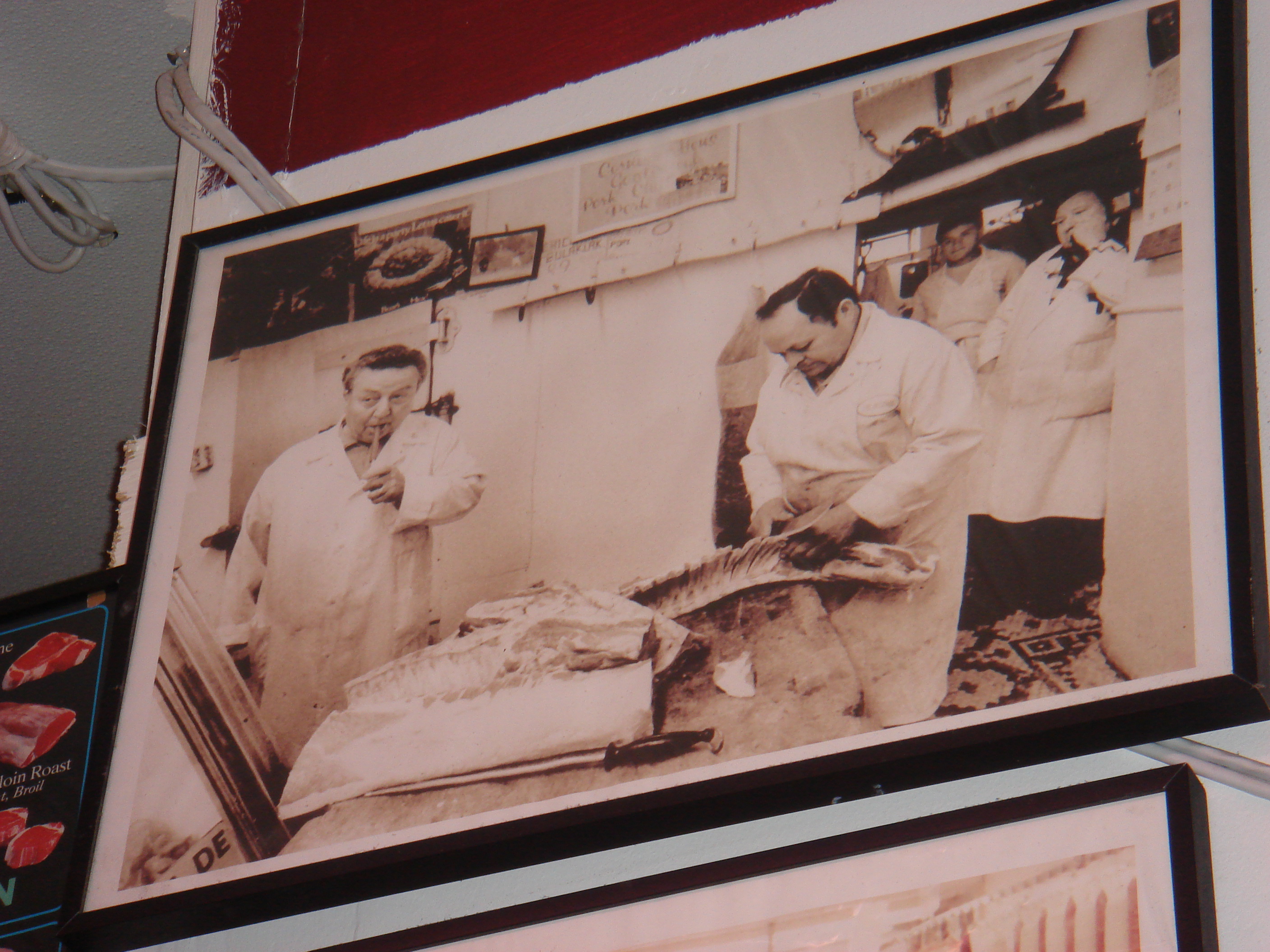
My grandfather, Antonio Affronti – known affectionately as Poppa Tony to my siblings and I – immigrated from Italy to the U.S. with his family when he was 19 years old. This was back in the late 1940’s when most of Brooklyn, NY, was empty lots, small shops, and a lot of immigrants from all over Europe living in tiny apartments with their families. In the early 1960’s my grandfather and his brothers, entrepreneurs in the truest sense, opened a small Italian-style butcher shop on Smith Street in Brooklyn called Los Paisanos Meat Market.

Paisanos started out simply: when the shop first opened they kept sawdust on the floor to absorb blood and liquids that dripped during butchering, and my grandfather would smoke Te-Amo cigars behind the counter while working (no joke). Like most entrepreneurs at the time they didn’t write down (or even think of) a policy for how to treat customers, they had no formal plans for how to grow the business, nor did they have to worry about Yelp reviews or complaints on Twitter.

A simple truth, however, was readily apparent to them: as a small retail business, your customers’ loyalty and trust in you and your product is the most important asset you can ever have. In 1965 they definitely did not have CRM tools, retention metrics, or even SendGrid (how did they get by?!). Instead they focused on having good conversations ‘over the counter’ as their customers ordered their food and shared a bit about their lives. Even when the store was packed and the line was outside the door, my grandfather and his staff always took the time to ask each customer questions like “How’s your family?”, “Did you take that trip?”, or “Is your son’s leg doing better?” These are not your “How’s the weather?” questions, these are the type of questions that demonstrate genuine caring and interest and ultimately increase loyalty and trust.

In the early ‘90s my father, Mike, took over Los Paisanos from my grandfather and has been running the business full-time ever since. His extensive background in retail shops, incredible attention to detail, and his love of meeting new people made him uniquely suited to run such a customer-driven business. Don’t worry, though, about Poppa Tony. He is 85 years old and still drives to the shop on Sundays to spend time behind the counter and to say hi to his favorite customers.

It’s 2015 and Paisanos Butcher Shop is still there now, standing proudly as one of the oldest family-owned business in Brooklyn and enjoying a loyal following of customers made up of local Brooklynites, Manhattanites who used to be Brooklynites, and even a few celebrities (who I believe are all Brooklynites). If you’re in town and around the neighborhood you should stop by; ask for the Paisanos Sandwich and I promise you won’t be disappointed.

My father has worked tirelessly to expand Paisanos over the years. It now includes a large wholesale operation that services many of the restaurants in Brooklyn and south Manhattan, and a new burger joint called “The Butcher Burger” that is inside the Barclay’s Center. This expansion and innovation has required some changes away from old habits, like the disappearance of the sawdust on the floor and the fact that the shop does not have a smoking section anymore. They have a computerized point of sale system, several accountants and bookkeepers, QuickBooks, and the requisite Yelp, Facebook, Instagram, and Twitter pages. Paisanos embraced technology in order to stay relevant, increase revenues, and grow its business.

I encourage you to walk into Paisanos sometime, lean against the wall, and just listen to the conversations that happen over the counter. I was there this week picking up some steaks and walked in on my father talking to a customer who, based on the conversation, had recently broken up with his girlfriend and was discussing the fallout with him. My father listened and shared some thoughts that were half “toughen up” and half “you’ll be okay” in their guidance, all while clearly showing they were friendly and that this customer trusted him. I reflected that this scene demonstrated my father’s Rolodex-like ability to remember almost every important personal fact and detail about the customers he talks with. Over the years I’ve learned that it’s not a salesman’s trick nor something he has to work that hard at; he genuinely cares and listens to his customers in every interaction he can. This level of conversation and caring has resulted in a strong 5-star rating on Yelp and glowing reviews of the staff at Paisanos. Along the way this slogan made its way onto the signage at Paisanos: “We treat you the way we want to be treated.”

I never went into the butcher business. Truth be told, the site of blood makes me kinda weak in the knees and I have focused my assistance on the technology and business sides of the house. Throughout my career in technology, whether at Microsoft during an Executive Briefing Session with a company, or at Klink when my CEO and I were hand-pitching our early customers, I have always remembered the examples my grandfather and father showed me time and time again: be genuine, get to know your customers, and you’ll earn their trust.

893164_395824873848819_675010379_o

Eat Your Dogfood

sleeping-rottweiler-puppy

“Employees should use the products and services produced by the companies that employ them. They should be emphatic fans of their company’s products. Nothing less.”

— “How to Get People to Eat Dog Food” by Ethan Mayers at AlleyWatch.

I remember when I first heard the question “Are you dogfooding?” shortly after arriving at Microsoft in 2004. I was puzzled for a second about why anyone would not use their own company’s products, especially when they were on the product team that was building them.

Fast forward a few months to the mid-point of the Outlook and Exchange 2007 release. Our dogfood email environment would periodically go completely down for days at a time and we would resort to using IMs and our bug reporting system to exchange important messages. I remember that some of our execs were not in the dogfood environment, but when they heard about the issues we were having they asked to be moved in their with us. They wanted to see for themselves what was going on and to give us a little pressure by having their dogfooding right next to us. Want a quick way to get your day-to-day product stability in shape? Inject a few executives and put their real email on the line and you’ll get blunt feedback, ‘fo sure.

My point here is not that we were in terrible shape in early Office 2007 engineering (we weren’t), nor that we weren’t dogfooding (we all were), or that execs are the best way to do Q/A (they’re not). My point is that as a product manager it’s easy to get stuck staring at the trees and to forget about the forest when working on a specific feature in a larger product. It’s something that can happen more frequently as startup teams get bigger and product managers get more specialized.

In another example from that team, I remember being heads down working on a specific and critical issue in Instant Search in Outlook (one of my features), and I assumed that someone else was seeing the reliability issues I was having with sending email in this specific configuration. I remember bringing up one of those reliability issues to the team that owned Mail Transport, and they determined that it was the specific way that I setup Outlook that was causing the issue (it was having multiple POP accounts loaded into a profile while searching across profiles), and no one else on the team was seeing it because it was setup- and timing-related. It was a critical bug because many of our customers would eventually have a setup similar to mine and therefore could have been susceptible to the issue once we rolled out the new feature.

As teams get bigger and more specialized it’s critically important that product managers dogfood their specific feature or product. It’s equally important, if not more so, to make sure you are always dogfooding end-to-end experiences outside of your feature ownership and across the entire breadth of products you build. You should also look for unique ways to get a fresh perspective while dogfooding. For example, we found that by adding the execs in at a time of difficult product stability during Outlook 2007 development, we were able to inject some “new eyes” into our day-to-day work and get some great objective feedback. This also helped us get dogfood coverage on features like Delegate Access, a setup that only happens when someone else manages your inbox and calendar in Outlook (a setup very unique to VP-level and higher users). In another case, we asked the entire product team to unplug their mouse for an hour to try and use Outlook via the keyboard only, helping us find a bunch of good bugs in our accessibility code.

Here on the Contactive team at ThinkingPhones, as our products get more complex and our team grows, we continue to dogfood every day and constantly come up with new ways to get those fresh perspectives. One of our favorites are weekly team-wide dogfood bashes to help get fresh eyes on new areas of our code. One of our product managers puts up a whiteboard, cranks the music (usually 80’s workout montages from Spotify), and everyone writes the bugs they find up on the board. We sometimes award “most interesting bug” and other fun prizes. You’d be amazed by what you can find with that kind of intense focus. We also have a “Bugs” email alias that gets traffic at all hours of the day, as we have all adopted the habit of sending screenshots and bug reports the minute we see them. We find that these types of efforts help increase the focus of the whole team on the quality of our products.

Our goal at ThinkingPhones is to be proud of our products and deliver amazing experiences to our customers. We believe pride comes from quality, and quality comes from eating your own dogfood.

Yum.  🙂